
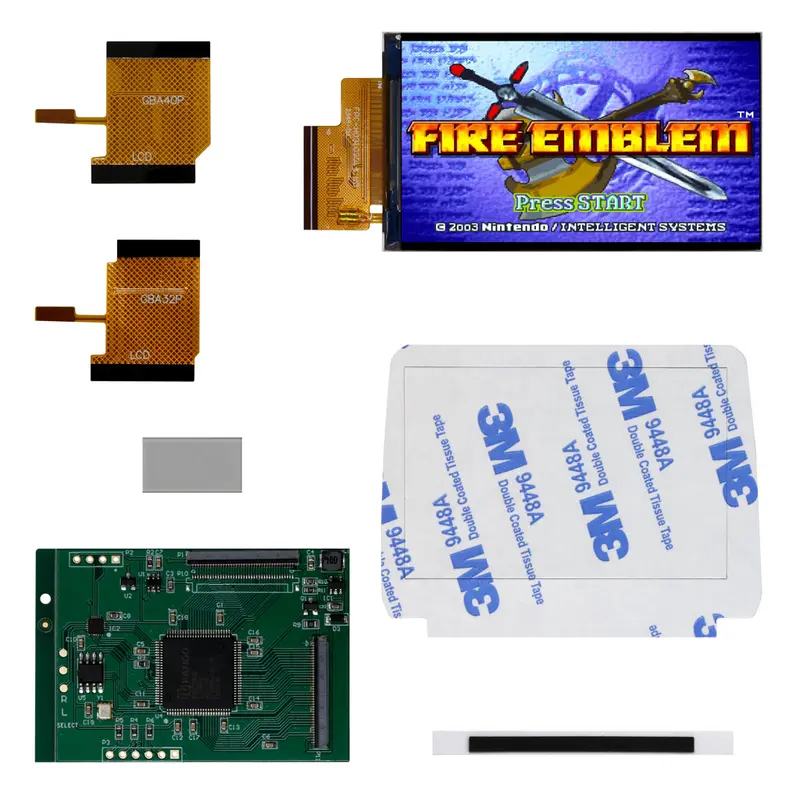

Add this IPS LCD to your Game Boy Advance to make your play more enjoyable with a modern display, featuring enhanced brightness, color and clarity!
This “Cloud” version is yet another type of IPS backlight you can buy for your Game Boy Advance. The main difference between this version and the Funnyplaying and “Hispeedido” versions is that this kit does not require shell modification or soldering for brightness adjustment.
FEATURES:
- Compatible with both 40 and 32 pin models.
- LCD dimensions are closer to an original LCD masking window – 2.9″.
- For original and original style shells, there is minimal shell trimming required.
- Center screen installation, no offset display
- Eight brightness adjustment options without soldering wires VIA touch sensor tap.
- B/W and color mode VIA touch sensor hold.
- Pixel modes VIA touch sensor hold.
- Cloud glass screen size recommended, not included.
- Can also be used with OEM and standard IPS Lens, however, OEM may result in the image being slightly cut off. IPS may result in a black border around image on LCD.
- Spacer included to align screen.
INCLUDED:
- 1x IPS LCD
- 1x PCB
- 1x 40 pin ribbon
- 1x 32 pin ribbon
- 1x Acrylic Spacer
- 1x Adhesive
- 1x Centering foam strip
DOCUMENTATION:
- Install Guide
- Install Video *This kit has recently been updated – this video shows the older version of the kit but can help with the general install if needed.
- How to test your LCD kit
NOTES:
- After installation, if it is noted that your touch sensor is overly sensitive or is cycling, please see this article for assistance.
- Tap touch sensor for brightness options.
- Hold touch sensor to cycle through color and pixel modes. Default is HD mode with color. You will cycle through pixel modes first in color > HD > BIPS > SL 1 > SL 2. After the last pixel option, you can continue to press hold for Black and White Mode in HD, then cycle through pixel options for BW as written above. If you want to get back to color mode, you will need to cycle through all the pixel modes which will ‘reset’ the LCD back to color HD mode (F-Zero).
WARNINGS:
- Test before installation! When you receive a backlight/LCD kit, you should perform a dry run before installing to assure that nothing has been damaged in transit. A dry run or test fit means the kit is not installed in the shell. This includes the use of adhesives, brackets, and any performed soldering. All ribbon cables should have no bends or creases in them. If you are unsure how to perform a dry run, please contact our support team and we will be happy to help. Backlight kits that have been installed are not eligible for replacement or return.
- LCD may break if put under too much pressure or dropped. Please exercise extreme caution when installing.
Reviews
There are no reviews yet.